> ## Documentation Index
> Fetch the complete documentation index at: https://docs.pulsy.app/llms.txt
> Use this file to discover all available pages before exploring further.
# Atria 0.8.23
> Share a feed with a public link, let anyone start from it, and read per-feed metrics in the dashboard.
**Released July 24, 2026**
This release adds public sharing for feeds. You can send someone a link to a feed and they can read its code and watch its events arrive live, without an account. It also gives every feed a Metrics tab, and fixes a set of problems on small screens.
## Share a feed with a link
Atria Cloud only
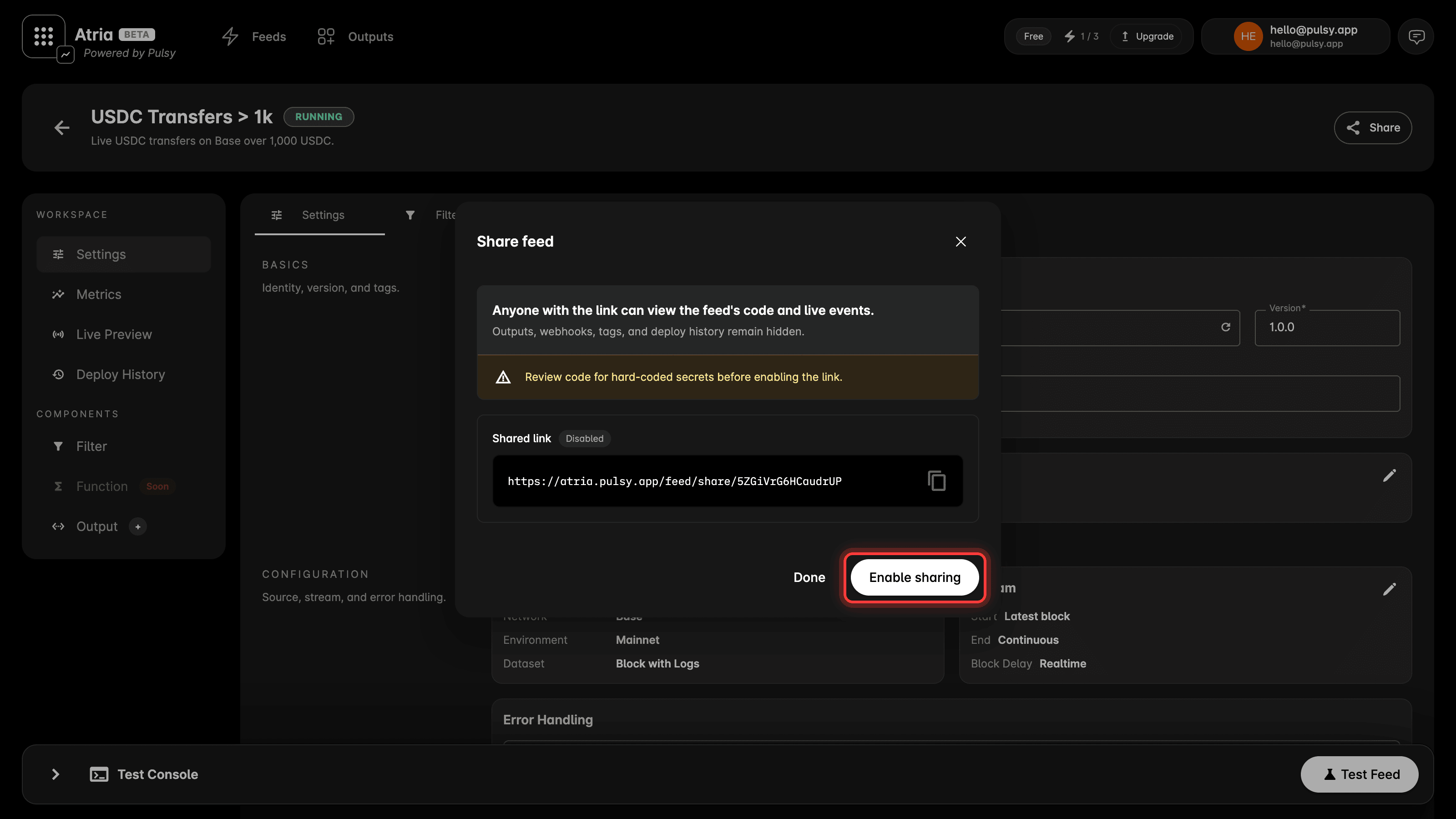
Open a feed and click **Share** in the feed header, then **Enable sharing**. You get a link like `https://atria.pulsy.app/feed/share/abc123`.
 Anyone with that link can open the feed without signing in. They see:
* The feed name, description and status.
* The network it reads and the data type it handles.
* The filter code.
* Results arriving live, the same stream you watch in your own workspace.
* The feed's metrics, including how much data it processed and how much it produced.
Outputs, webhooks, tags and deploy history stay private. They are never on the shared page.
Sharing is off until you turn it on, and turning it off stops the link from opening the feed.
**Read your code before you enable a link.** Whatever is hard-coded in your filter is visible to anyone who opens it. The dialog says the same thing.
See [share a feed](/atria/dashboard/share-a-feed) for the full detail.
### Start from a shared feed
A shared feed has a **Use this data** button. It copies the feed into your own workspace as a new feed, with the settings and the code already in place. You then add your own output before you test or deploy, since outputs are not part of what gets shared.
The button works for people who do not have an account yet. They sign up, and the feed is waiting for them when they land.
So a link is not only something to read. Send someone a feed that already does the thing, and they start from it instead of from an empty editor.
### Link previews
Paste a shared link anywhere that unfurls links, like Slack or X, and it renders a preview card with the feed name and its network.
## Feed metrics
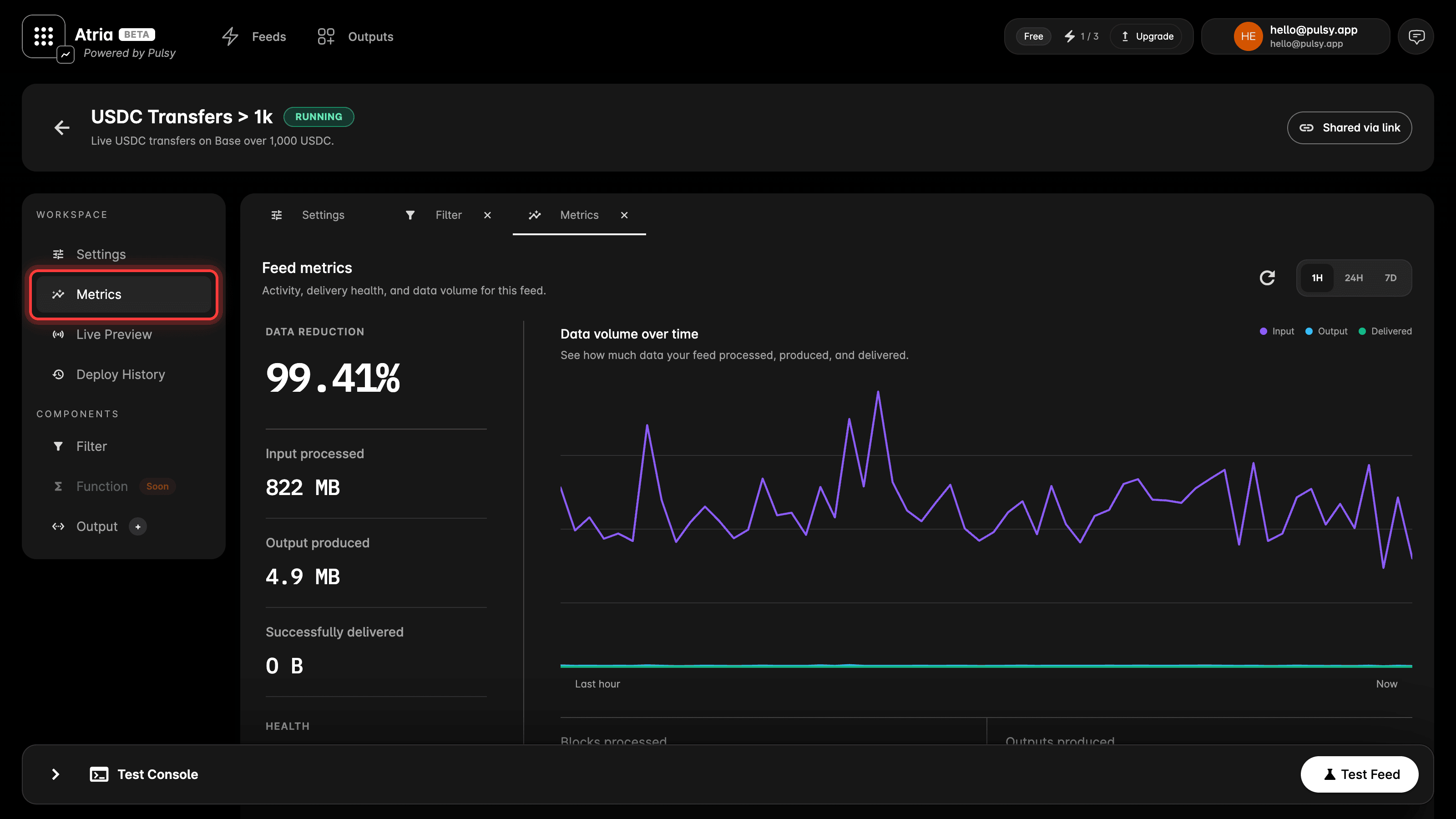
Every feed now has a **Metrics** tab.
Anyone with that link can open the feed without signing in. They see:
* The feed name, description and status.
* The network it reads and the data type it handles.
* The filter code.
* Results arriving live, the same stream you watch in your own workspace.
* The feed's metrics, including how much data it processed and how much it produced.
Outputs, webhooks, tags and deploy history stay private. They are never on the shared page.
Sharing is off until you turn it on, and turning it off stops the link from opening the feed.
**Read your code before you enable a link.** Whatever is hard-coded in your filter is visible to anyone who opens it. The dialog says the same thing.
See [share a feed](/atria/dashboard/share-a-feed) for the full detail.
### Start from a shared feed
A shared feed has a **Use this data** button. It copies the feed into your own workspace as a new feed, with the settings and the code already in place. You then add your own output before you test or deploy, since outputs are not part of what gets shared.
The button works for people who do not have an account yet. They sign up, and the feed is waiting for them when they land.
So a link is not only something to read. Send someone a feed that already does the thing, and they start from it instead of from an empty editor.
### Link previews
Paste a shared link anywhere that unfurls links, like Slack or X, and it renders a preview card with the feed name and its network.
## Feed metrics
Every feed now has a **Metrics** tab.
 Health:
* Blocks processed.
* Outputs produced.
* Failures.
* Successfully delivered.
Volume:
* Data reduction, how much smaller your output is than the raw block data it was built from.
* Data volume over time, input processed against output produced.
Choose a range of the last hour, 24 hours or 7 days.
This answers a question you could not answer before: is the feed keeping up, and are its deliveries landing. The dashboard already showed the cursor and the chain head, so you could see how far behind a feed was, but not whether its output was getting through.
## Fixes
* The dashboard sets a viewport meta tag, so it scales properly on a phone.
* Fixed dialogs and feed tables on small screens.
* Fixed the chat panel on small screens. Atria Cloud only
* Feed tables now look and behave the same across the app.
* Tidied up the feed workspace layout, header and navigation.
Health:
* Blocks processed.
* Outputs produced.
* Failures.
* Successfully delivered.
Volume:
* Data reduction, how much smaller your output is than the raw block data it was built from.
* Data volume over time, input processed against output produced.
Choose a range of the last hour, 24 hours or 7 days.
This answers a question you could not answer before: is the feed keeping up, and are its deliveries landing. The dashboard already showed the cursor and the chain head, so you could see how far behind a feed was, but not whether its output was getting through.
## Fixes
* The dashboard sets a viewport meta tag, so it scales properly on a phone.
* Fixed dialogs and feed tables on small screens.
* Fixed the chat panel on small screens. Atria Cloud only
* Feed tables now look and behave the same across the app.
* Tidied up the feed workspace layout, header and navigation.